🏫 For Irish schools, ETBs & colleges

School & College EV Charging App IrelandStaff bays, open days and match days, booked in advance.

Staff book a bay and a charger before they leave home, and visitors book parking for open days and matches in advance. Set the days and hours you offer, and any driver can book in those windows, so you can share your car park and help drivers find a charger or a space on their route while Ireland builds out its charging network.

📖 See the hub setup guide →
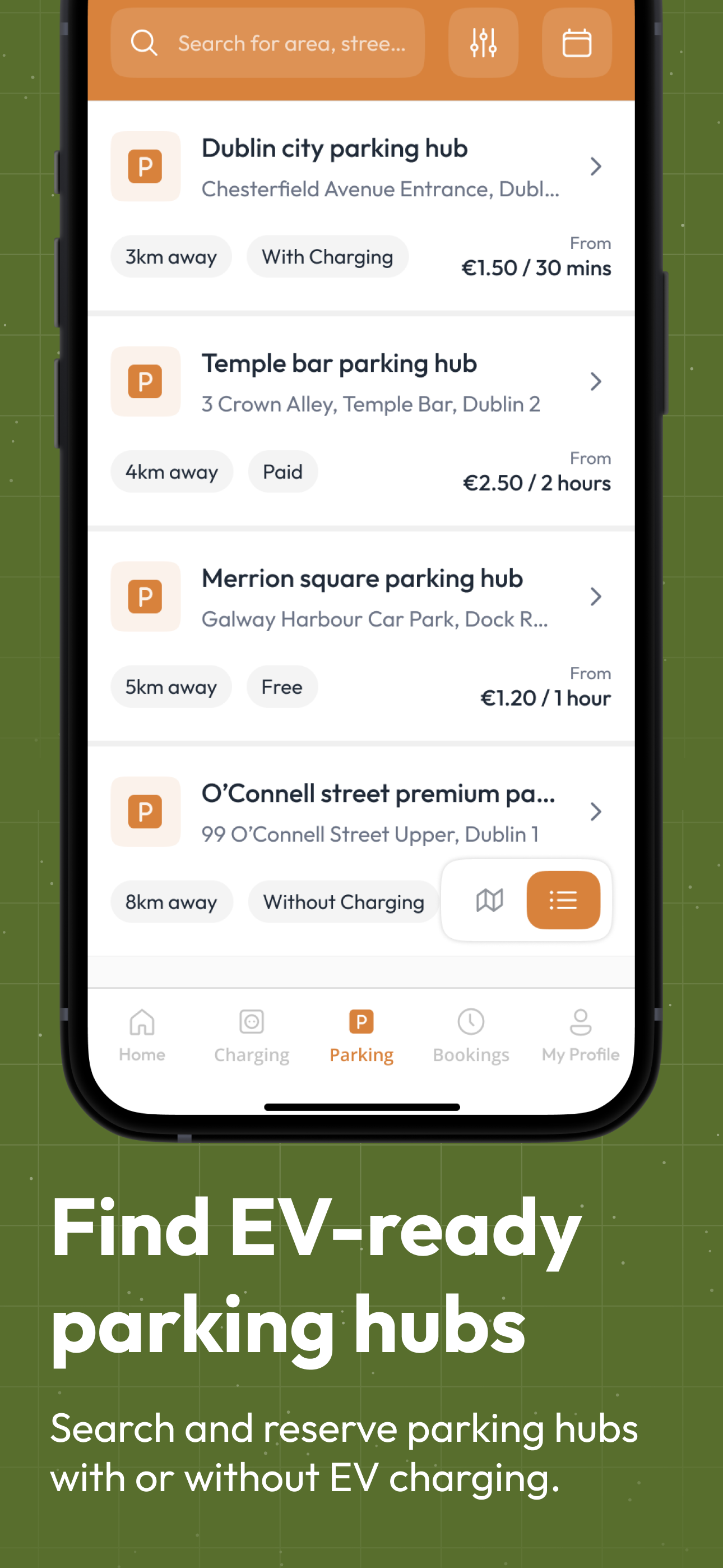
De Energy Hub app parking hubs list showing distance, charging availability and prices
Open eveningVisitor parking, booked in advance
Home › App › Schools & Colleges

What does De Energy Hub do for a school or college?

De Energy Hub is a booking app for EV charging and parking. A school, ETB or college lists its car park, its chargers or both, sets the days, hours and rates, and drivers book through the app. Staff promo codes come from De Energy Hub, parking for open days and matches is booked in advance, and every booking shows who made it. It works with the EV chargers you already own.

Who it is for
Primary and secondary schools, ETBs, third-level campuses and childcare facilities
What you list
A Parking Hub for the car park, a Charging Hub for the chargers, or both linked as Park & Charge
Your team
A member of staff sets up the hubs and answers driver queries in the app.
Your earnings
You keep 100% of the rate you set on full-price bookings. A 15% service fee and VAT are added on top and shown before the driver pays.
Set-up
Works with your existing EV chargers, no listing fee, typically under an hour. See the hub setup guide
A scene every school knows

Open evening, 18:45. A full car park, one charger, and nobody sure who it is for.

An illustration of the same car park, first with no booking and then with advance booking.

Without booking
18:45The visitor car park is filling up
19:00A parent circles, looking for a space
19:20Two cars wait for the same charger
Nobody can say who a space or a charger is for, and the event has already started.
With advance booking (example)
17:30 to 18:30Parking
18:30 to 19:30Parking
19:30 to 20:30Parking
Example slots on a 1 hour minimum booking. Drivers need the app and an account to book. A cancelled booking frees the space straight away.
What a school needs

Six things schools and colleges ask for, and what the app does about each

Each one links to the full detail, with real app screens.

The need

A calm start to the school day for staff who drive electric

Staff book a bay or a charger in advance in the app, or scan the QR code at the bay to start a booking, and check in through the booking on arrival. Reminders go to the driver before the booking ends, at the end time and shortly after.

How booking and check-in work →
The need

Parking for open days, parents' evenings and match nights

List a Parking Hub, set the days and hours you offer, and write the event dates in the hub's rules and instructions. Parking is priced per 30-minute slot, with a weekday rate and a weekend rate, and drivers book a space in advance.

How parking rates and slots work →
The need

Charging as a staff perk, without reimbursing anyone

Request promo codes from De Energy Hub and share them with your staff. A complimentary code skips the payment screen and the school covers the electricity, while a discounted code takes a percentage off the overall price.

How promo codes work →
The need

Letting drivers see the renewable electricity you generate

Each charger carries an energy label you choose in the app: Pure Energy (100% renewable electricity from your own site), Smart Energy (a mix of renewables and the grid) or Boost Energy (full grid power at maximum kW). If your chargers provide 100% renewable electricity from your own site, Pure Energy puts that in front of drivers before they book.

How energy labels work →
The need

Several centres, one account

One host account can run every centre, with one Charging Hub and one Parking Hub per Eircode. Each hub keeps its own days, opening hours, minimum booking length and rate, and your home screen shows upcoming bookings, open queries, hub counts and earnings by day, week and month.

How hubs work across sites →
The need

Knowing who booked what

Past and upcoming bookings show who made each one, and you are notified when a driver checks in or out. Reports are available from De Energy Hub on request.

What a host sees in the app →
What you list

Not every driver needs a charger, but every driver needs a space

List a Parking Hub for the spaces, a Charging Hub for the chargers you already have, or link the two as Park & Charge.

🅿️

Parking Hub

Bookable spaces at the car park you already have

  • Open days, matches and graduations: spaces booked in advance, with the event date in the rules and instructions.
  • Free or paid, with a weekday rate and a weekend rate for each 30-minute slot.
  • One QR code per space, and a tick for the vehicle types it suits, including Large Van/Minibus.
+Park & Charge
⚡

Charging Hub

Bookable charging on the chargers you already own

  • Each charger listed with its name, maximum speed, connector type and brand.
  • Your rate per kWh, and an energy label for each charger.
  • One QR code per charger, printed and placed on site.

Link the two and one booking and one payment covers the space and the charger.
How each hub works → Hub setup guide →

Staff promo codes

Free or discounted charging for staff, set up by De Energy Hub.

Request promo codes from De Energy Hub. We set them up in advance to your requirements, and you share the code with your staff.

  1. 1

    Request a code from De Energy Hub

    We set it up in advance: number of uses, including per person and per month, an expiry date, and whether it covers parking, charging or both.

  2. 2

    Share it with your staff

    The code is assigned to the school, which passes it on. Named-user codes are possible if you ask for them.

  3. 3

    Staff type it in when they book

    A complimentary code takes the booking to €0.00 and skips the payment screen. A discounted code takes a percentage off the overall price and the user pays the balance.

🆓 Complimentary: the school covers the electricity as a staff perk🏷️ Discounted: a percentage off the overall price
Say who it is for. Name your hub or charger, for example "Acme Employees Only". Drivers see the name on the search overview and again on the booking screen. Link a Parking Hub to your Charging Hub and the rules you write there show on the charger's overview too. Your own policy can tell staff to consider cancelling a booking they cannot use, so a colleague can book the bay.
How promo codes work →
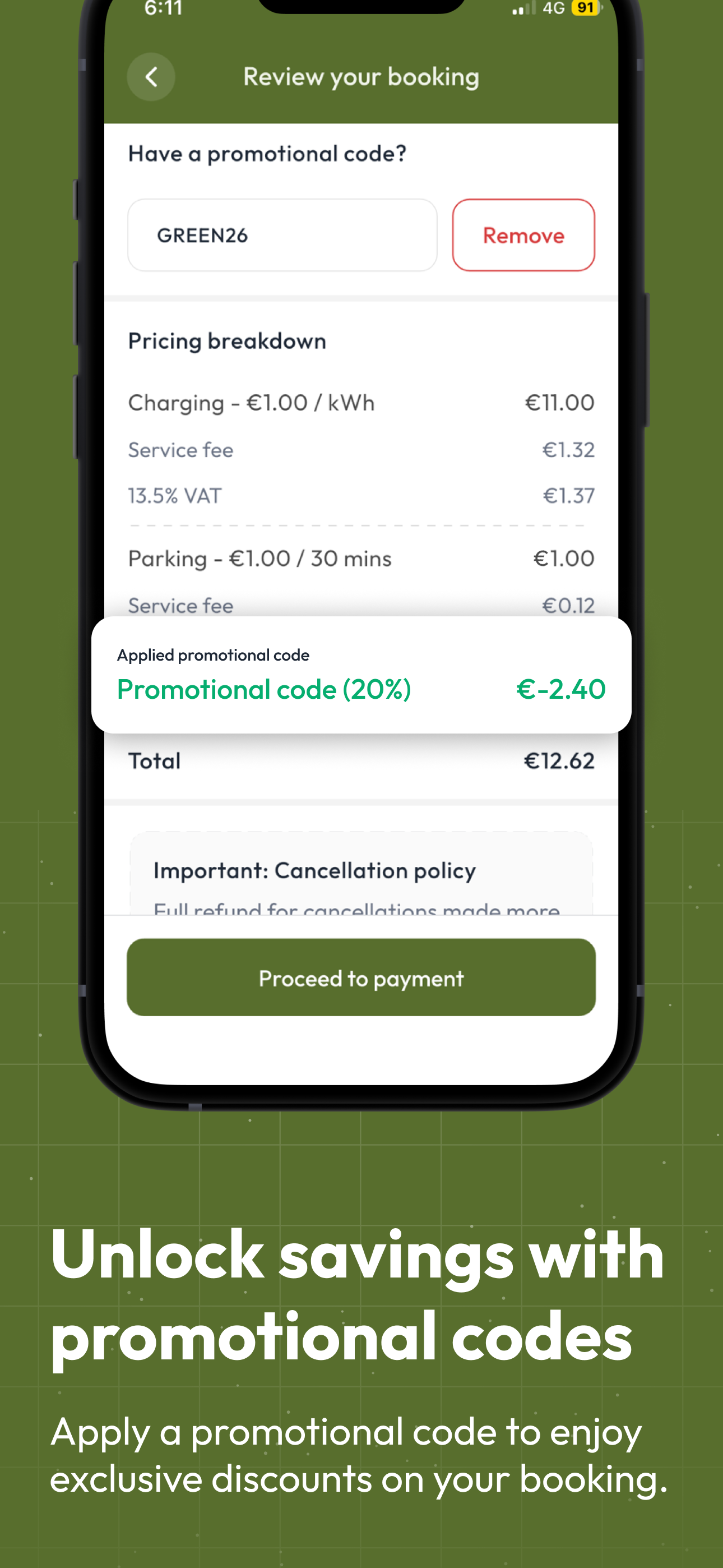
De Energy Hub app review booking screen showing the pricing breakdown and the promotional code field
🎟️ Have a promotional code?
Review your bookingThe pricing breakdown and the promo code field, as drivers see them.
Guides & resources

Where to go next

📘 All app featuresHubs, booking, pricing, promo codes and QR codes, with real app screens. 📖 Hub setup guideEvery screen for creating a Charging Hub and a Parking Hub. 💼 Workplace charging and BIKThe general rules for employers, explained in a guide. 🅿️ Parking booking system guideHow QR parking booking works for car parks. 💶 Charging and parking pricingA reference for charging and parking prices in Ireland when you set your rates. 📈 Earn from a charger or spaceHow businesses and owners earn from a charger or parking space.
Got questions?

Schools & Colleges FAQ

Does De Energy Hub work for primary schools, secondary schools, ETBs and colleges?

+
Yes. A single charger at a preschool and several chargers across a campus are listed the same way. Add a Charging Hub, a Parking Hub or both for each site, set your days, hours and rates, and print the QR codes. One host account can run several sites, with one Charging Hub and one Parking Hub per Eircode, so an ETB or school group can list each of its centres.

How do staff get free or discounted charging?

+
Request promo codes from De Energy Hub, which sets them up in advance with a number of uses, an expiry date and whether the code covers parking, charging or both. The school shares the code with staff, and staff type it into the 'Have a promotional code?' field when they book. A complimentary code skips the payment screen and the school covers the electricity, offered as a perk for staff. A discounted code takes a percentage off the overall price and the user pays the balance. Any other driver who books pays the rate the school sets.

Can we take parking bookings for open days, parents' evenings and matches?

+
Yes. List a Parking Hub, set the days and hours it is available and the minimum booking length, and state the event dates in the hub's rules and instructions. Parking is priced per 30-minute slot with a weekday rate and a weekend rate, so drivers can book a space in advance for the event. Drivers are reminded before their booking ends, at the end time and shortly after.

Can parents, contractors and visitors charge or park?

+
Yes. Every hub you list is visible in the app to any driver. A visitor books in advance by searching, or scans the QR code at the bay to start a booking. They see your rate, the 15% service fee, VAT and the total before they confirm, and check in through the booking. Visitors need the app and an account to check in. The school can also book for a guest, who still needs the app and an account to check in.

Can a school minibus or van use it?

+
Yes. The school's own drivers use driver accounts, which are separate from the host account, and book like any driver. Each Parking Hub shows which vehicle types it suits, including Large Van/Minibus, and you can add a height limit if you have one. The app features page explains how hubs are set up.

How do drivers pay, and what does a member of staff do?

+
Drivers pay by card through the app. They see your rate, the 15% service fee and VAT, and the total before they confirm, and on full-price bookings you keep 100% of the rate you set. Payouts are made daily, at the end of the day, when there is something to pay out. A member of staff sets up the hubs and answers driver queries through the app, and you are notified when a driver checks in or out.

Is free staff charging a taxable benefit?

+
That is a question for Revenue, and the rules can change, so check the current position with Revenue or your accountant before you share staff codes. De Energy Hub does not give tax advice. Our guide to workplace EV charging and the BIK exemption explains the general rules.

School and college features current as of October 2026. Questions? Get in touch.

Share your car park and chargers on the days you choose, and help drivers find a space on their route.

Works with the EV chargers you already own. De Energy Hub is live now on the App Store and Google Play. Download the app to list your school.