🗺️ For Irish tourist attractions & visitor sites

EV Charging & Parking Booking System for Attractions
Welcome every visitor, and every driver passing through.

Open your car park and chargers to every road user. Day visitors book Park & Charge for their car, and drivers passing through book a charger or a space on their route.

📖 See how to list your site →
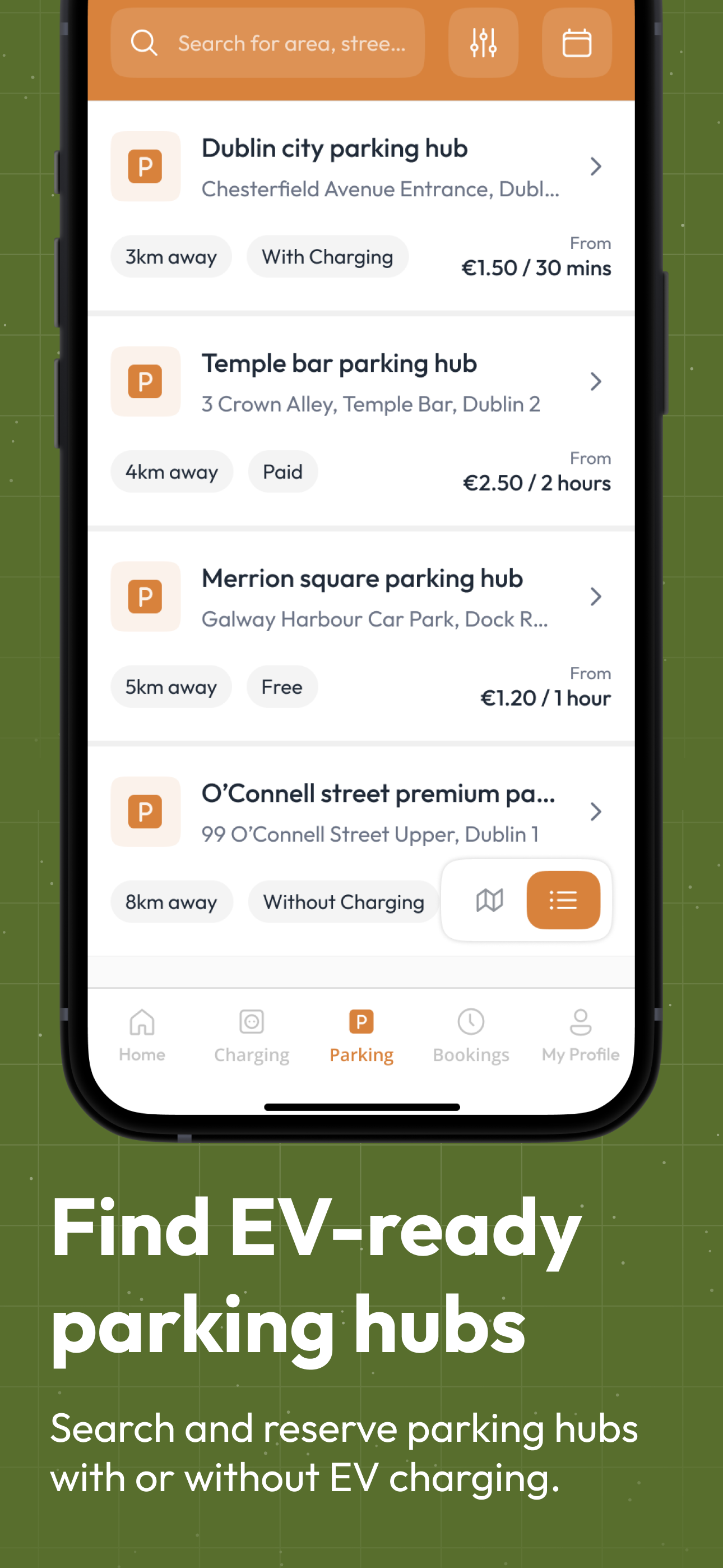
De Energy Hub app parking hubs list showing distance, charging availability and prices
🅿️ Parking Hub
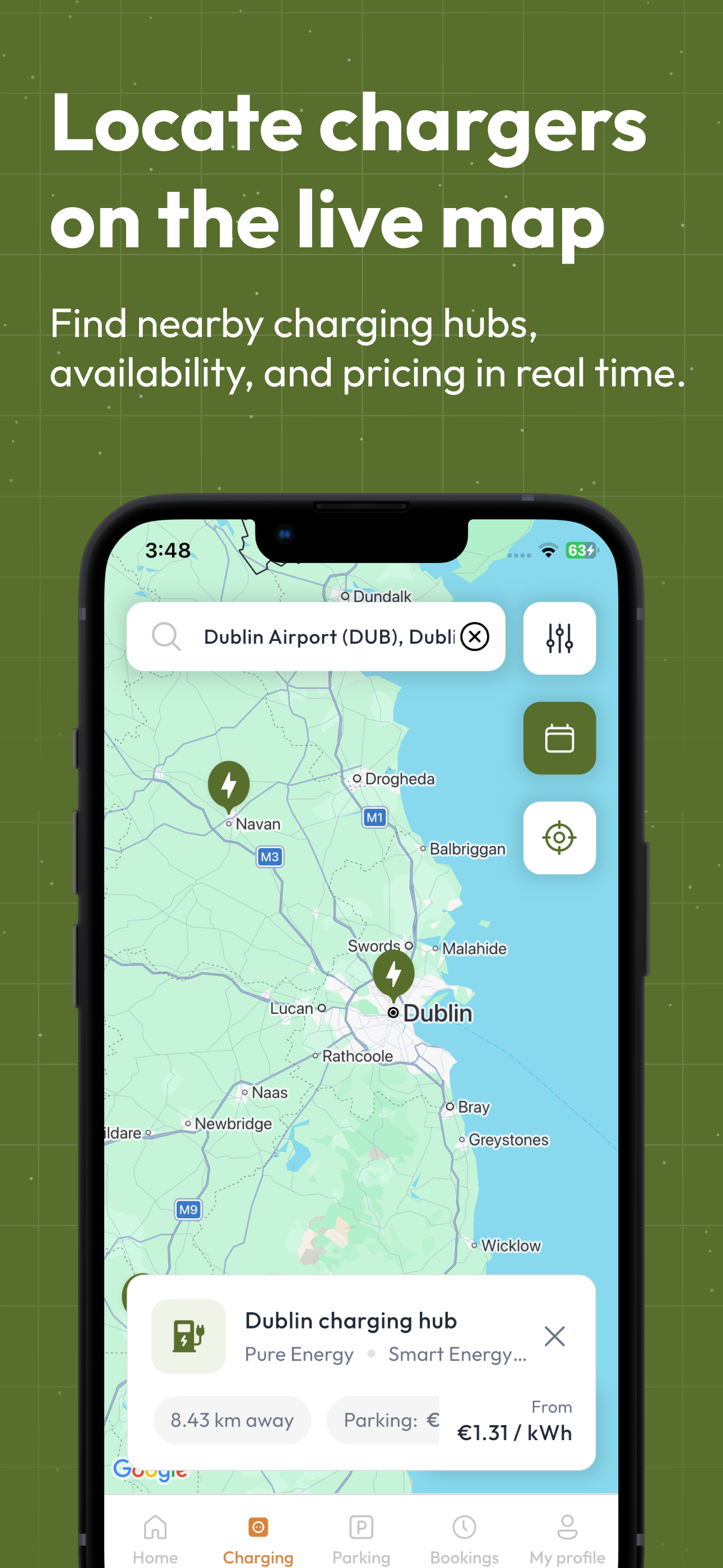
De Energy Hub app map of EV charging hubs with rate and price
⚡ Charging Hub
Home › App › Tourist Attractions, Visitor Sites & Car Parks

What does De Energy Hub do for a tourist attraction?

De Energy Hub is a booking app for EV charging and parking. A visitor attraction lists its car park, its chargers or both, sets its own rates and hours, and drivers book through the app. Day visitors book Park & Charge for their car, and drivers on the road, including coaches, vans, campervans and fleets, can find and book a space or charger on their route. It works with the EV chargers you already own.

Who it is for
Visitor attractions, heritage sites, visitor centres and tourism car parks
What you list
A Parking Hub, a Charging Hub, or both linked as Park & Charge
Your earnings
You keep 100% of the rate you set on full-price bookings. A 15% service fee and VAT are added on top and shown before the driver pays.
How it works
Every feature has real screens on the app features page, and the hub setup guide covers set-up.
Set-up
Works with your existing EV chargers. Create a host account, add your hubs, print your QR codes. Typically under an hour. See the setup steps
A scenario every tour operator knows

11:20 AM. The coach is here. The charger is taken.

The group is booked on a tour. Both chargers are in use, it is first come, first served, and the driver cannot leave to look for another site.

🏞️The attraction car park, 11:20 AM
🔌Charger 1In use
🔌Charger 2In use
Visitor desk: "Sorry, both are in use. It's first come, first served."

Driver: waiting with a full coach, a tour to run and nowhere else nearby to charge.

📱Booked ahead, 8:30 that morning
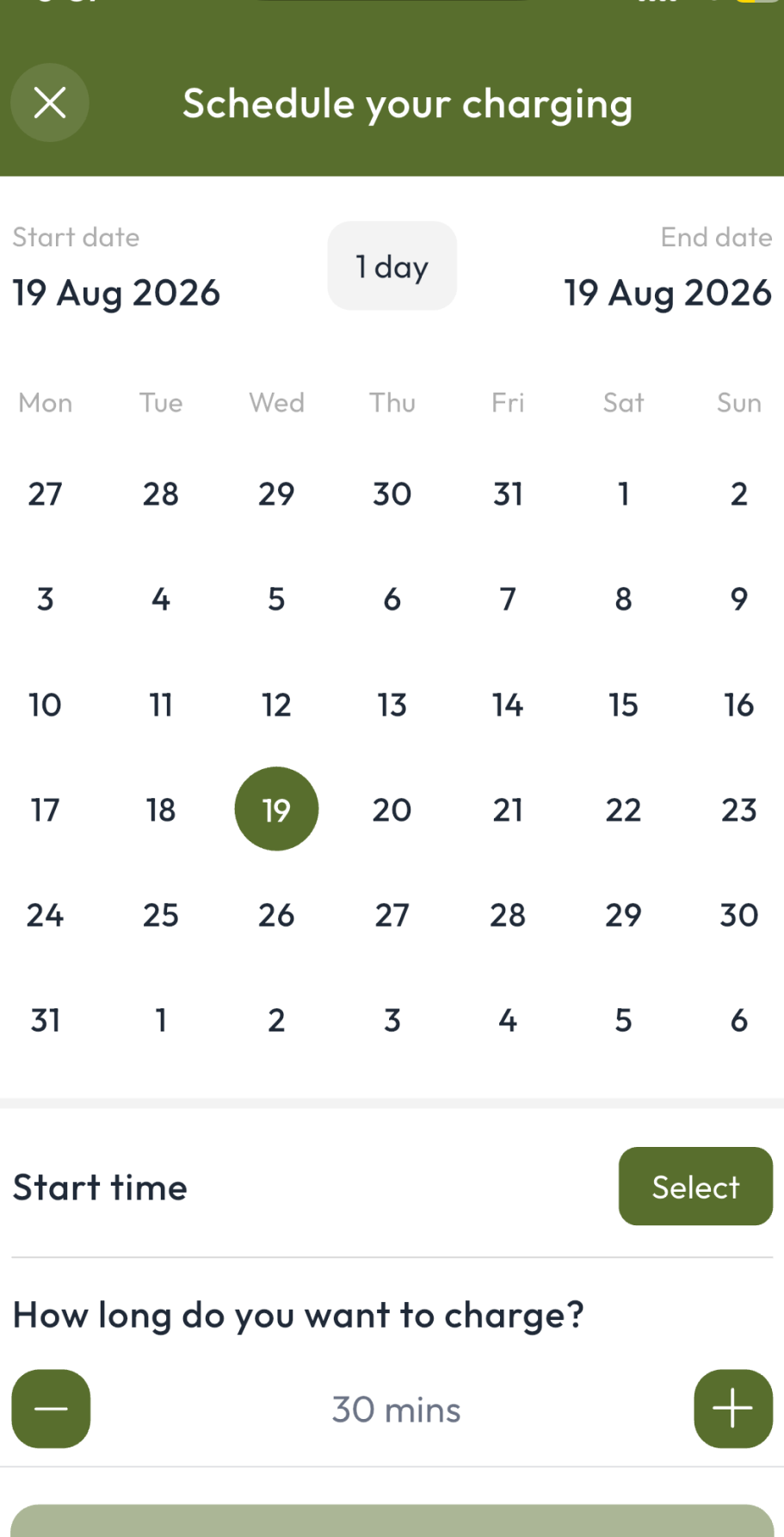
De Energy Hub app: schedule your charging by choosing a date, start time and duration
  • A charger chosen in advance
  • A time that suits the tour
  • Confirmed before the coach sets off

The operator searches the app, books a time and checks in through the booking on arrival. Drivers need the app and an account, and your team sets the hub up once. How booking and check-in work →

Problems and fixes

Five things that go wrong in an attraction car park, and the fix for each

Each fix links to the full detail, with real app screens, on the app features page.

  1. The problem

    Peak days fill the car park before the first visitor

    Festival weekends, bank holidays and event days fill the bays first come, first served, and nothing can be planned ahead.

    The fix

    List a Parking Hub and take bookings in advance, with a weekday and a weekend rate for each 30-minute slot. Put event dates in the rules and instructions. Reminders help bays turn over.

    How Parking Hubs work →
  2. The problem

    Coaches and campervans arrive at bays that do not suit them

    Nobody knows the height limit or which vehicles fit until they are at the barrier.

    The fix

    Tick the vehicle types your Parking Hub suits and add an optional height limit, so drivers can see which vehicles suit your bays before they set off.

    How hubs and their rules work →
  3. The problem

    Day visitors need a space, and some need a charge too

    A single pay-and-display style answer does not fit a car park where only some bays have chargers.

    The fix

    Choose free or paid parking, set your own rate per kWh, and link the two hubs as Park & Charge so one booking covers the space and the charger. Drivers see the price before they confirm.

    How pricing and fees work →
  4. The problem

    Tour partners and quiet days need a reason to come

    Off-peak visits and partner groups are hard to reward without handing out cash.

    The fix

    Request promo codes from De Energy Hub for complimentary or discounted charging or parking, limited by uses and expiry date.

    How promo codes work →
  5. The problem

    Nobody on site has time to watch the chargers

    The team is busy with visitors, and there is no record of who used what.

    The fix

    You are notified when a driver checks in or out, every booking shows who made it, and driver messages arrive in the app. Your team sets it up once.

    What a host sees in the app →
What you list

Not every visitor needs a charger, but every visitor needs a space

List the space, the chargers, or both. De Energy Hub works with the EV chargers you already have.

🅿️ Parking HubBookable bays with no charger required. Weekday and weekend rates per 30-minute slot, with vehicle types and an optional height limit.
⚡ Charging HubEach charger listed with its speed, connector type and brand, and your rate per kWh. Each charger gets its own QR code.
🔗 Park & ChargeLink the two so one booking and one payment covers the space and the charger for day-visitor cars.

How each hub works, including Park & Charge →

Right vehicle, right hub

Show drivers which vehicles your site suits

Tick the vehicle types on your Parking Hub so coach, van and campervan drivers know your bays suit them. Link it to your Charging Hub and drivers can filter by vehicle type as well as charger speed, connector type and distance.

Vehicle type
At an attraction
🚗 Car/SUV
Day visitors
🚐 Large Van/Minibus
Group transfers and tour minibuses
🚌 Bus/Truck
Coaches and other buses and trucks
🏕️ Campervan
Touring campervans

Vehicle types and connectors, in full →

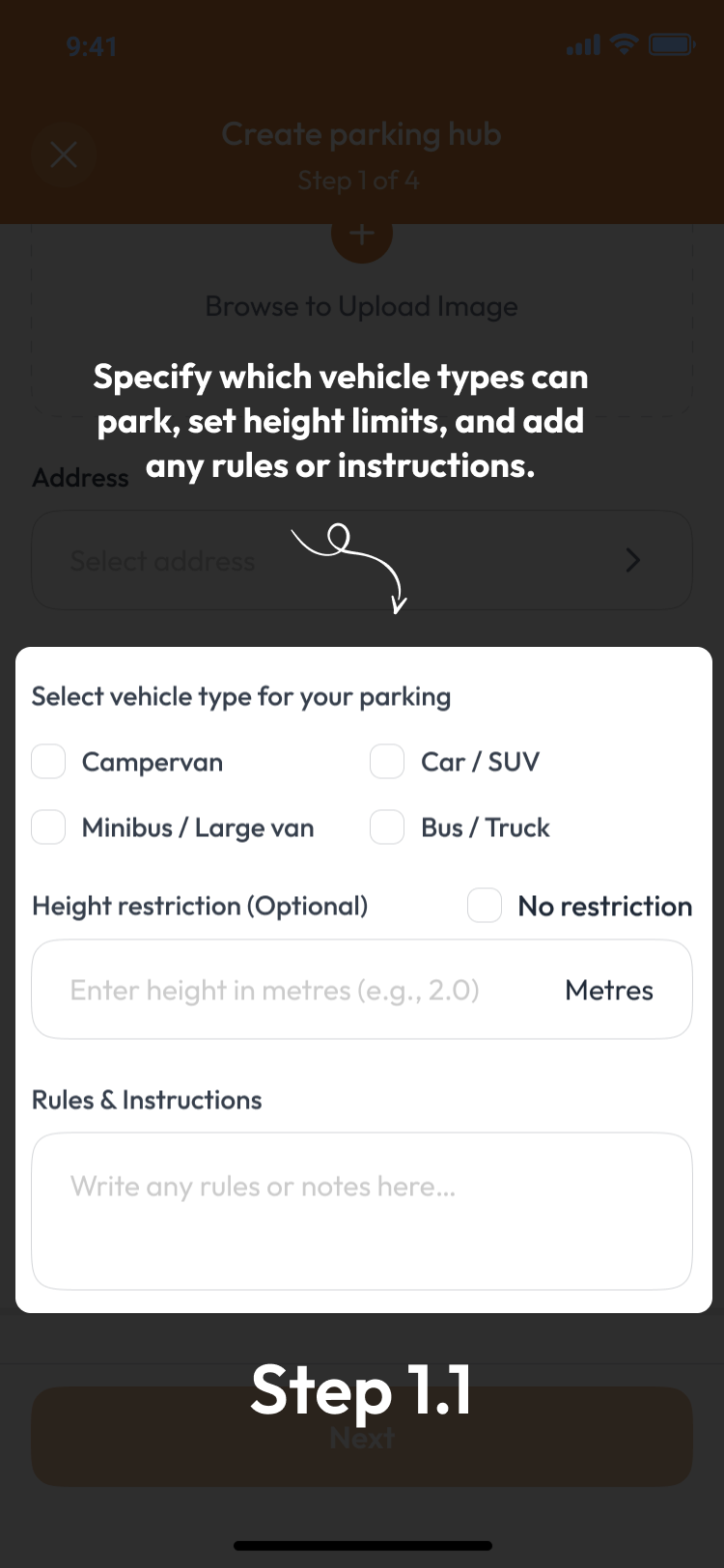
De Energy Hub app, step 1.1: choose which vehicle types can park, set a height limit and add rules
Choose vehicle typesSpecify which vehicle types can park, set an optional height limit and add any rules or instructions.
Setup guides & resources

Everything you need to get started

📖 Hub setup guideEvery screen for creating a Charging Hub and a Parking Hub. 🧰 Host featuresBookings, notifications, messages and earnings in the app. 📘 All app featuresHow hubs, bookings, promo codes and pricing work. 🅿️ Parking booking system guideHow QR parking booking works for car parks. 💶 Charging and parking pricingA reference for charging and parking prices in Ireland when you set your rates. 📈 Earn from a charger or spaceHow businesses and owners earn from a charger or parking space.
Got questions?

Tourist Attractions & Car Parks FAQ

Can coaches, vans and other larger vehicles charge or park at a visitor attraction?

+
Yes. Tick the vehicle types your Parking Hub suits (Car/SUV, Large Van/Minibus, Bus/Truck or Campervan) and list each charger with its speed and connector type. When the Parking Hub is linked to your Charging Hub, drivers can filter by vehicle type, as well as by charger speed, connector type and distance, to find sites that fit their vehicle.

Can a coach operator book a charger or space for a specific tour time?

+
Yes. Operators book in advance in the app, choosing a start time and a length from the booking lengths you set, for example around the time passengers spend at the site. They check in through the booking when they arrive.

How does EV charging work for day visitors arriving by car?

+
Day visitors use Park and Charge: one booking covers a parking space and a charger. They book in the app, either by searching ahead or by scanning the QR code at the bay, see the rate and total price before they confirm, and check in through the booking.

Can other businesses and fleets use my charger and car park?

+
Yes. Every hub you list is visible in the app to any driver, including company vehicles and fleets travelling across Ireland. You set the rates, the opening hours and the booking length, and on full-price bookings you keep 100% of the rate you set.

Can I charge different rates, or offer free or discounted charging, to staff, partners and tour groups?

+
Parking has a weekday rate and a weekend rate, and you set a rate per kWh for each energy label you offer. You can change a hub's rate when it has no bookings. For staff, partners, tour groups or quieter months, request a promo code from De Energy Hub. It can be discounted or complimentary, limited by number of uses and expiry date, and set to cover parking, charging or both. You share the code, and the user enters it when they book.

Does this work with the chargers we already own, and what does it take to run?

+
Yes. De Energy Hub works with the EV chargers you already own. Download the app and create a host account, then add a Parking Hub, a Charging Hub or both, set your hours, rates and booking length, and print the QR code for each charger or space. A member of your team sets up the hubs and answers driver queries through the app, while visitors book and check in themselves. You see every booking and who made it, and you are notified when a driver checks in or out. Drivers pay by card and see your rate, the 15% service fee and VAT, and the total before they confirm. Payouts are made daily, at the end of the day, when there is something to pay out. See the hub setup guide on the app page.

Are there grants available for installing EV chargers at a visitor attraction or car park?

+
Grants and tax reliefs change, so check the current position on the SEAI and Revenue websites before you install. These are government schemes and are not administered by De Energy Hub.

More questions? See the app FAQ and the app features FAQ, or get in touch. Tourist attraction features current as of October 2026.

Open your site to every road user: car, van, coach or campervan.

Works with the EV chargers you already own. De Energy Hub is live now on the App Store and Google Play. Download the app to list your site.