🏡 For holiday lets, self-catering & Airbnb hosts

Holiday Let & Airbnb EV Charging IrelandCharging that comes with the stay.

Give your guests a charger they can book themselves. It works with the charger you already have, and the app takes the booking and the payment, so you do not need a pay station. Include charging in the stay, or let guests pay your rate. Set the days and hours you offer, and any driver can book in those windows, helping more people charge while Ireland builds out its charging network.

Download on the App Store Get it on Google Play
See the hub setup guide →
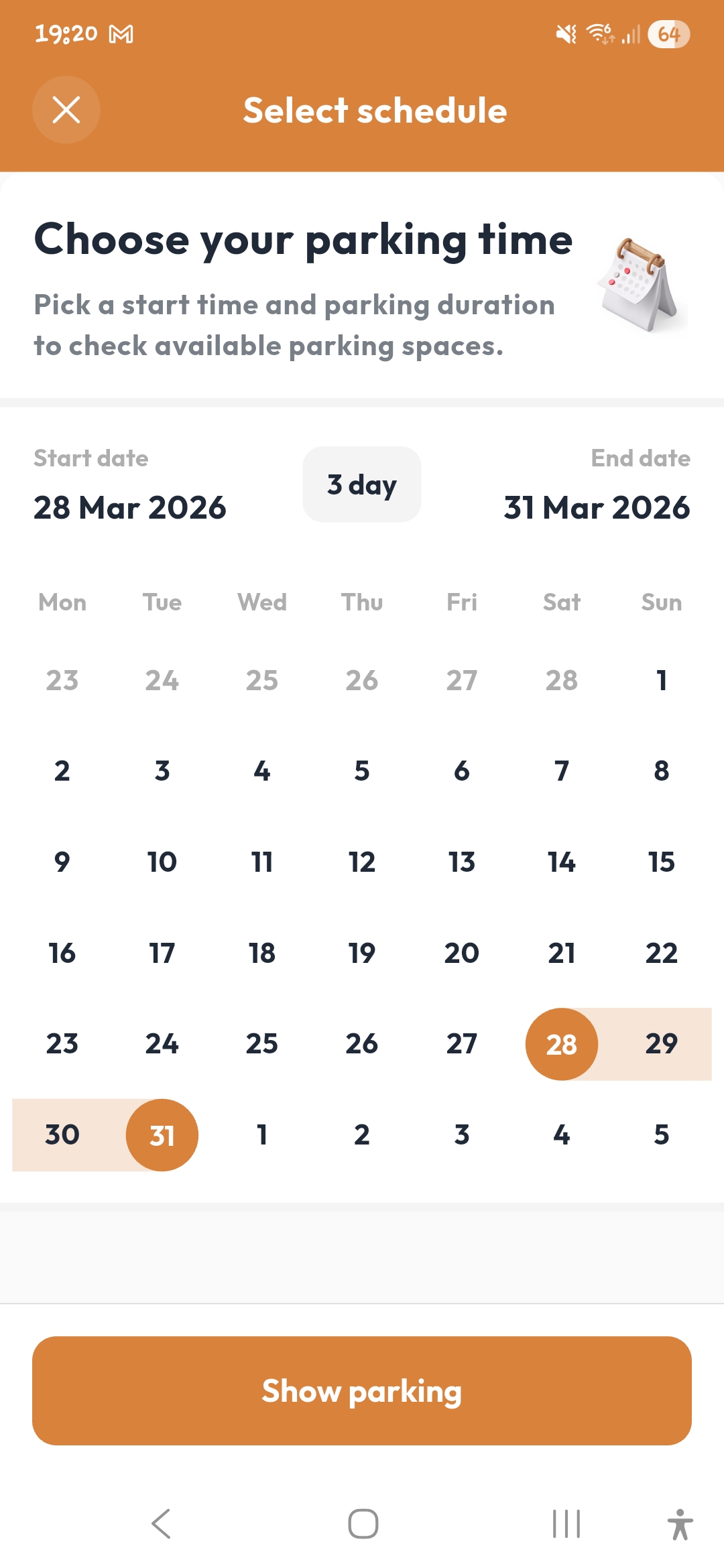
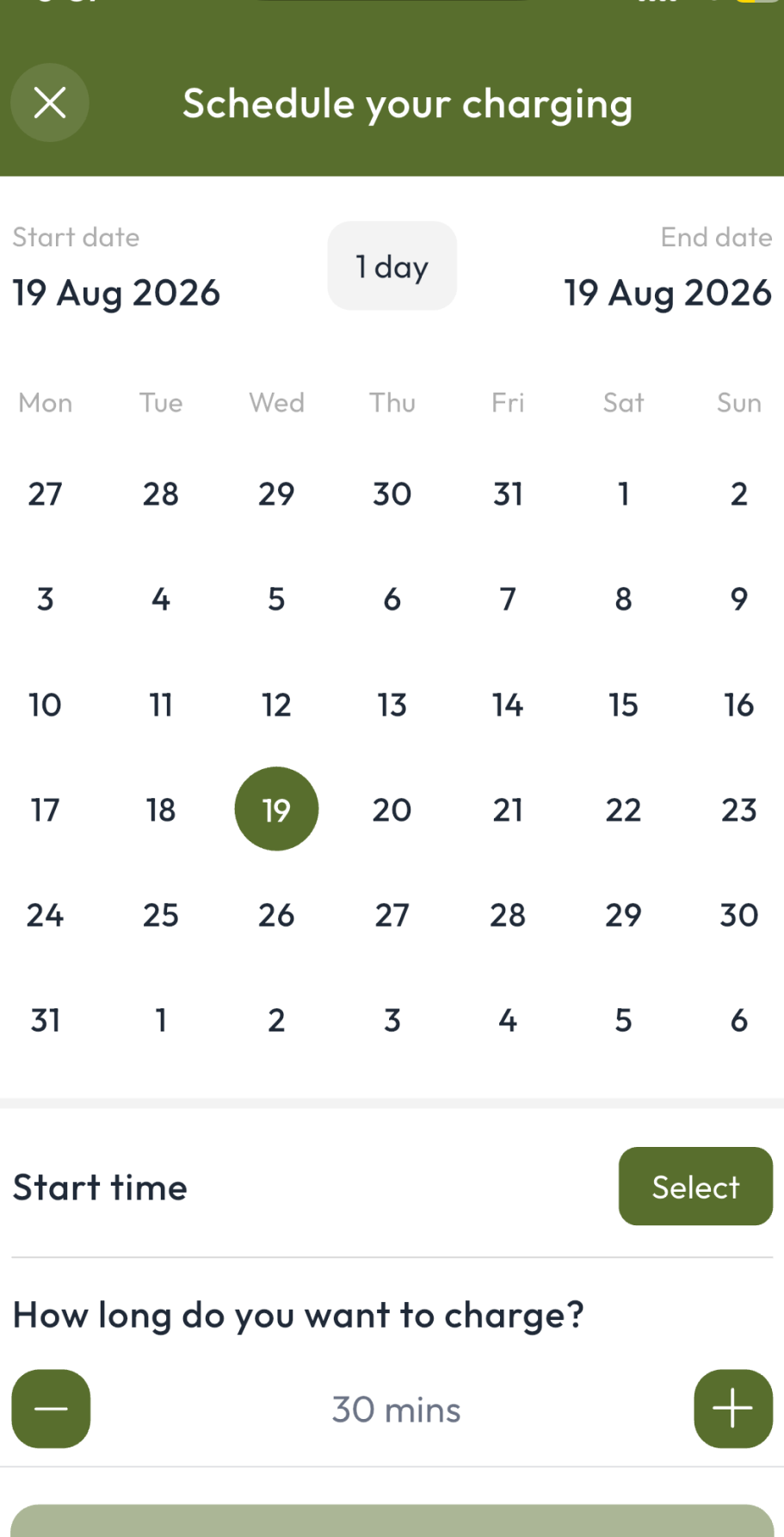
De Energy Hub app: schedule your charging by choosing a date, start time and duration
📅 Pick the dates
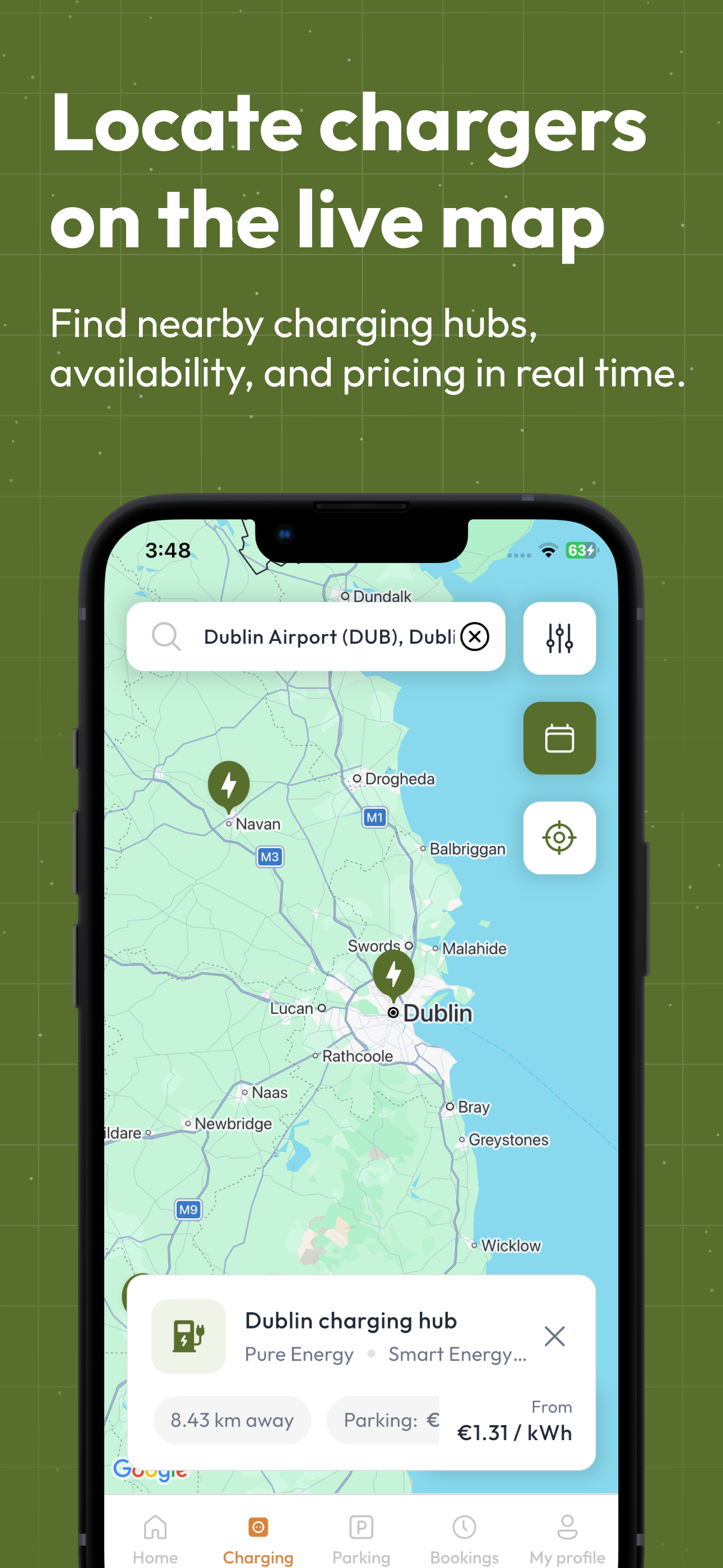
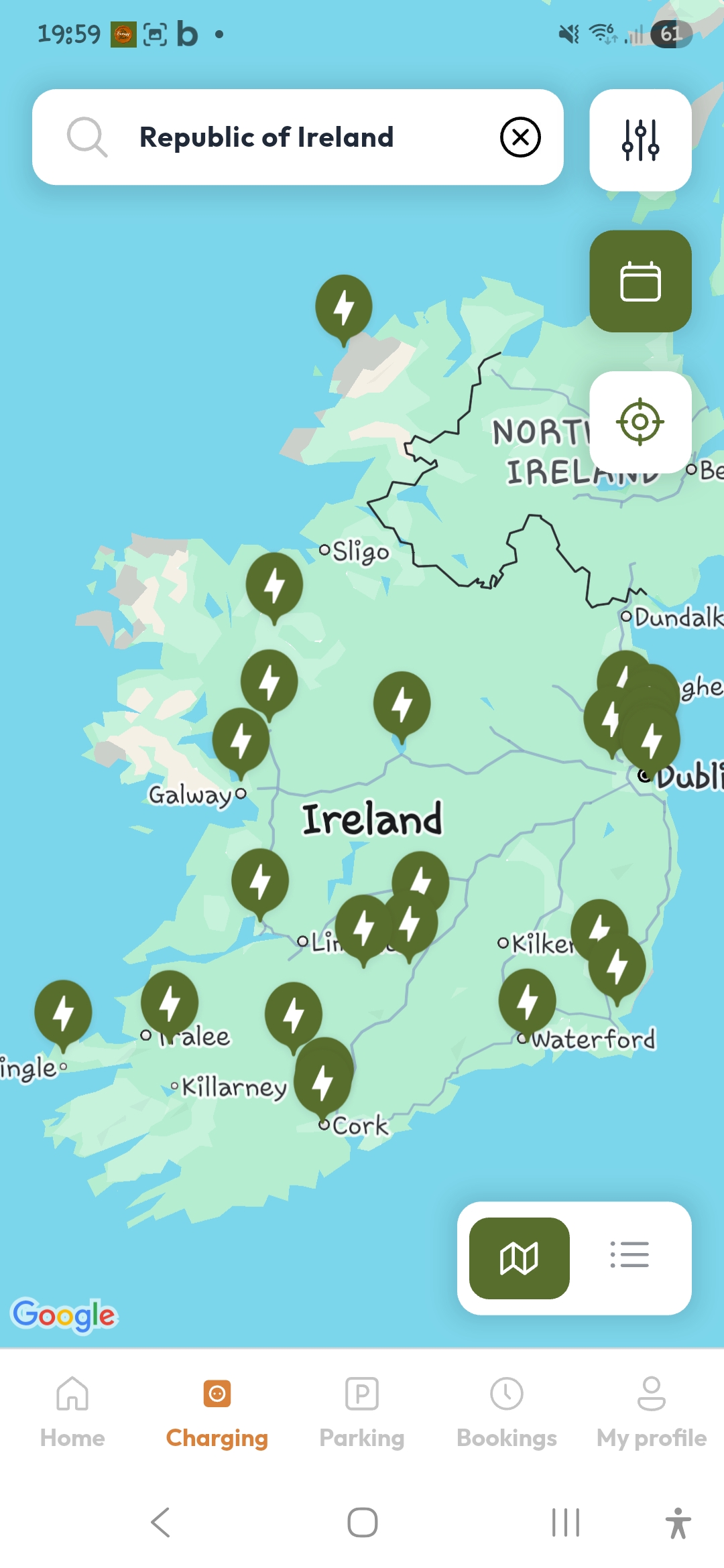
De Energy Hub app live map of EV charging hubs with rate and availability
⚡ Find your charger
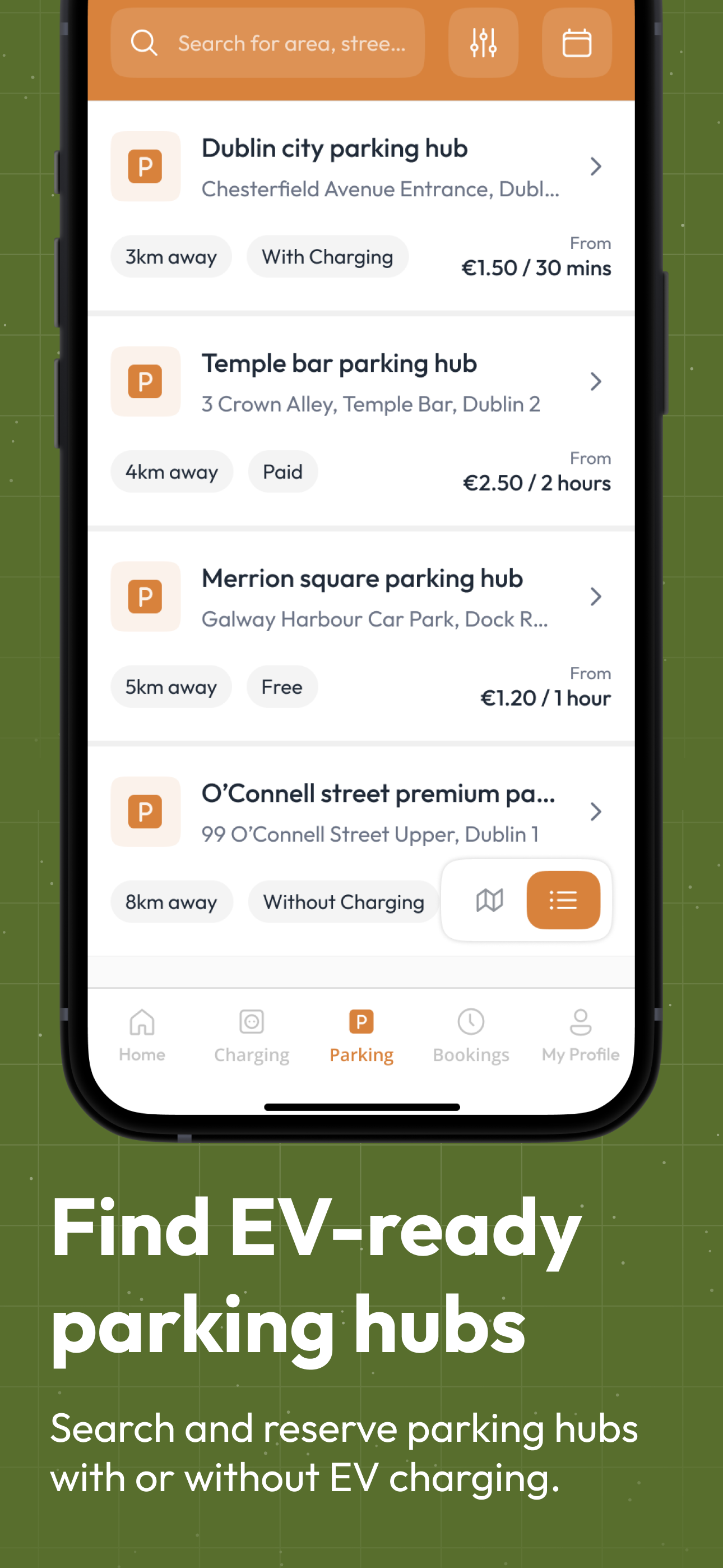
De Energy Hub app parking hubs list showing distance, charging availability and prices
🅿️ Park and charge
Home › App › Holiday Lets & Airbnb

What does De Energy Hub do for a holiday let?

De Energy Hub lets a holiday let, self-catering property or Airbnb host list their EV charger as a bookable hub. Guests book in advance or scan the QR code at the charger, check in through the booking, and see the price before they pay, or charge free with a complimentary promo code from De Energy Hub. It works with the charger you already have, and the app takes the booking and payment, so no pay station is needed.

Who it is for
Holiday lets, self-catering cottages and Airbnb hosts with a charger
What you list
A Charging Hub for your charger, and optionally a Parking Hub for the space, linked as Park & Charge
For your guests
Included in the stay with a promo code, or paid at your rate
Your earnings
You keep 100% of the rate you set on full-price bookings. A 15% service fee and VAT are added on top and shown before the driver pays.
Set-up
Works with your existing charger, with no pay station needed. Add it in the app and print its QR code. Typically under an hour. See the hub setup guide
A scene every host knows

Friday afternoon. The guests have arrived, and you are not there.

An illustration of the same arrival, first with an informal arrangement and then with the charger booked in the app.

Without booking
On arrivalThe guest is not sure which socket to use or whether it is theirs to use
LaterThey message you to ask, and wait for a reply
At check-outNobody has a record of who charged, or who should pay for the electricity
Everything depends on messages and goodwill.
With booking in the app (example)
Before arrivalOne booking covers the stay, from the start date to the end date
On arrivalThe guest scans the QR code at the charger and checks in through the booking
Any timeYou are notified at check-in and check-out, and the booking shows who made it
Example only. The guest needs the app and an account. A multi-day booking is priced as continuous time from start to end at your rate, and the guest sees the total before they pay, or enters a complimentary code from you.
A guest's stay, start to finish

From booking the dates to checking out

Every step runs through the app, using the same screens your guests see.

De Energy Hub app: choose your parking time by selecting a start and end date for a multi-day booking
🗓️
Before they arrive

Book the whole stay

Guests can book charging, parking or both together, or you can book for them. Choose the start and end date of the stay in one booking.

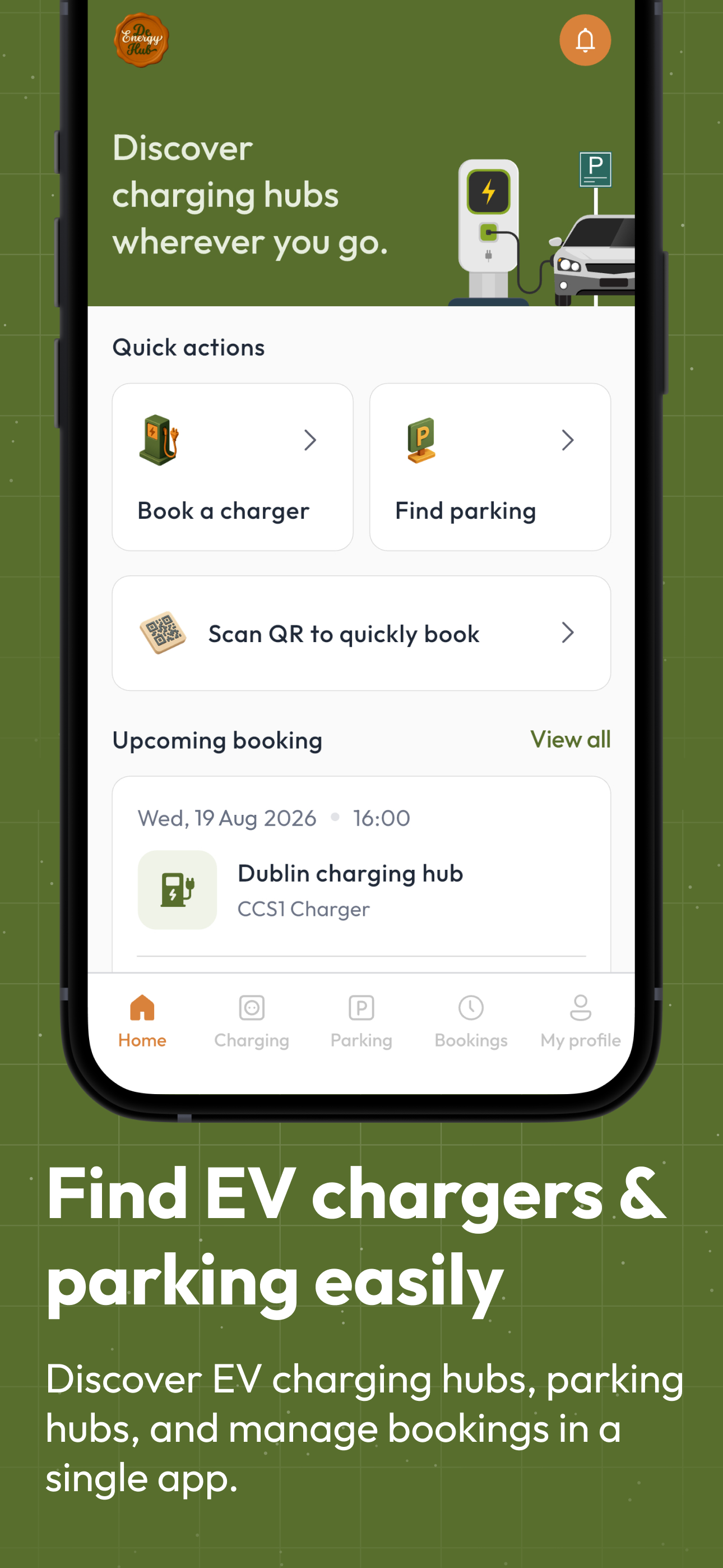
De Energy Hub app home screen with Book a charger, Find parking and Scan QR to quickly book
📲
On arrival

Scan, then check in

Your branded QR code sits at the charger. A scan opens the booking screen for that exact charger, and the guest checks in through the booking.

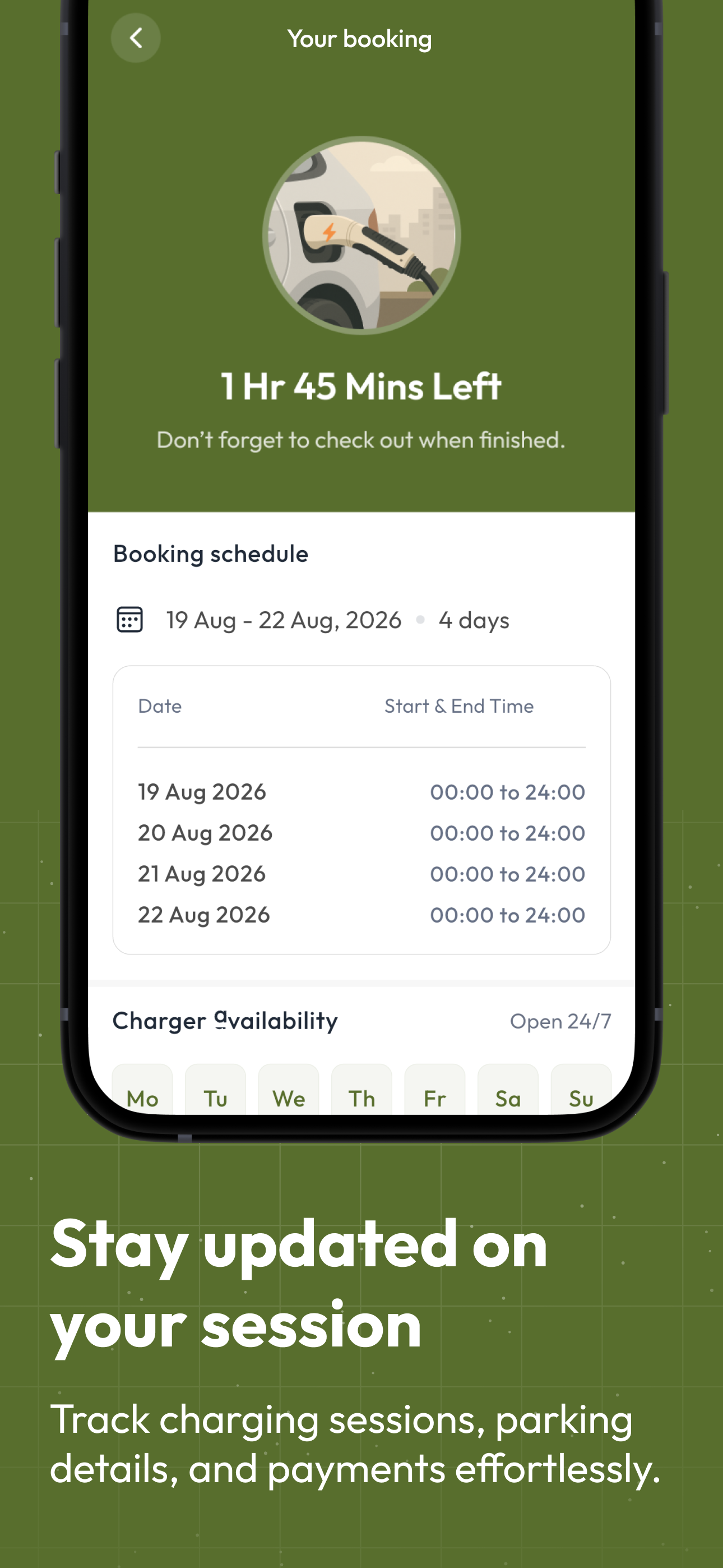
De Energy Hub app booking screen showing time left, the booking schedule and charger availability, with a reminder to check out
⏱️
During the stay

Time left, and a nudge to check out

Guests see time left and the booking schedule, and get reminders as the booking comes to an end. You are notified when they check in and out.

Your call

Three ways to offer charging to guests

Choose per stay, or mix them on the same charger.

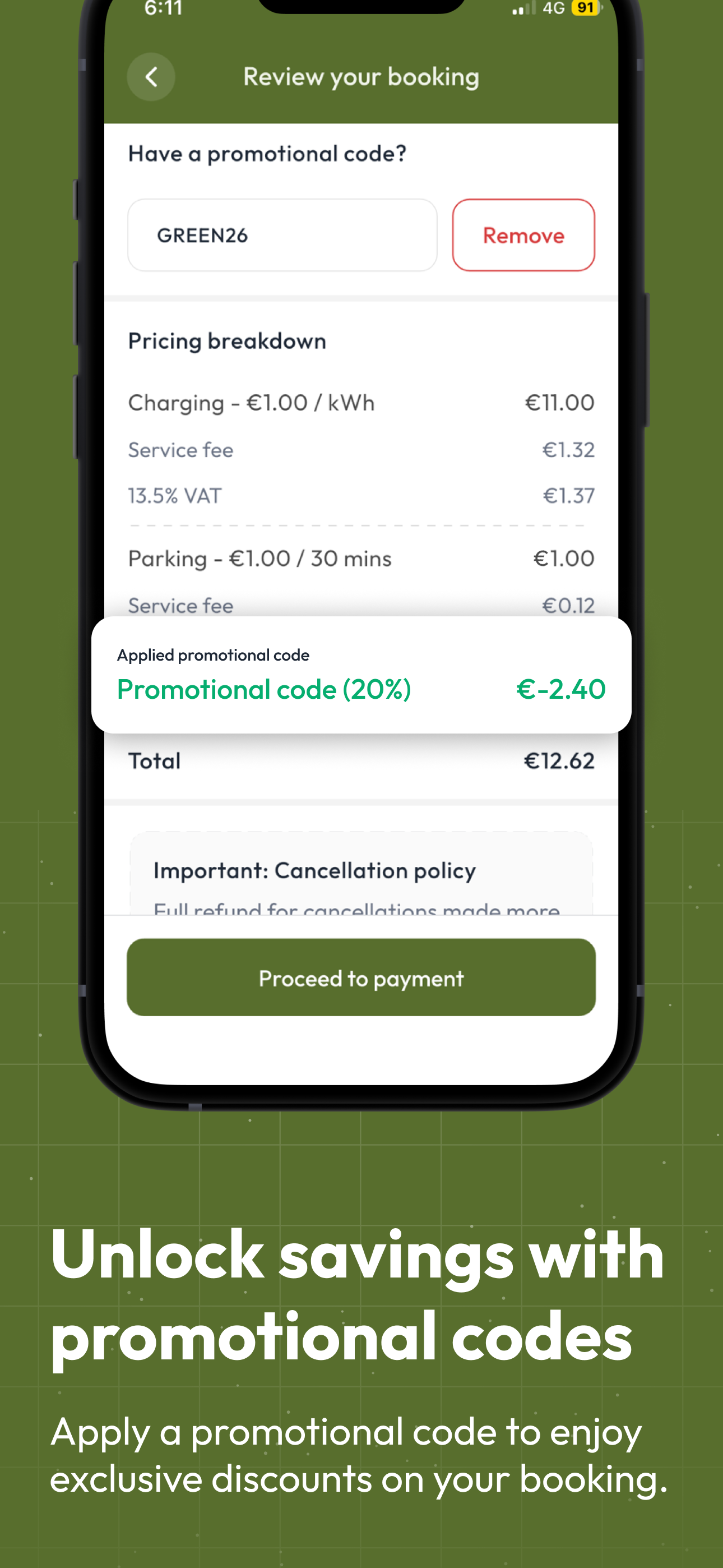
De Energy Hub app review booking screen with pricing breakdown and promo code

Make charging part of the stay

Request a complimentary promo code from De Energy Hub and share it with your guests. They enter it in the promotional code field when they book, and charging is included in their stay. You cover the electricity on a complimentary booking, so it works as a perk for your guests.

  • Codes are set up in advance with a number of uses, including per person and per month, and an expiry date
  • Cover charging, parking or both
  • A discounted code takes a percentage off the overall price, and the guest pays the balance

How promo codes work →

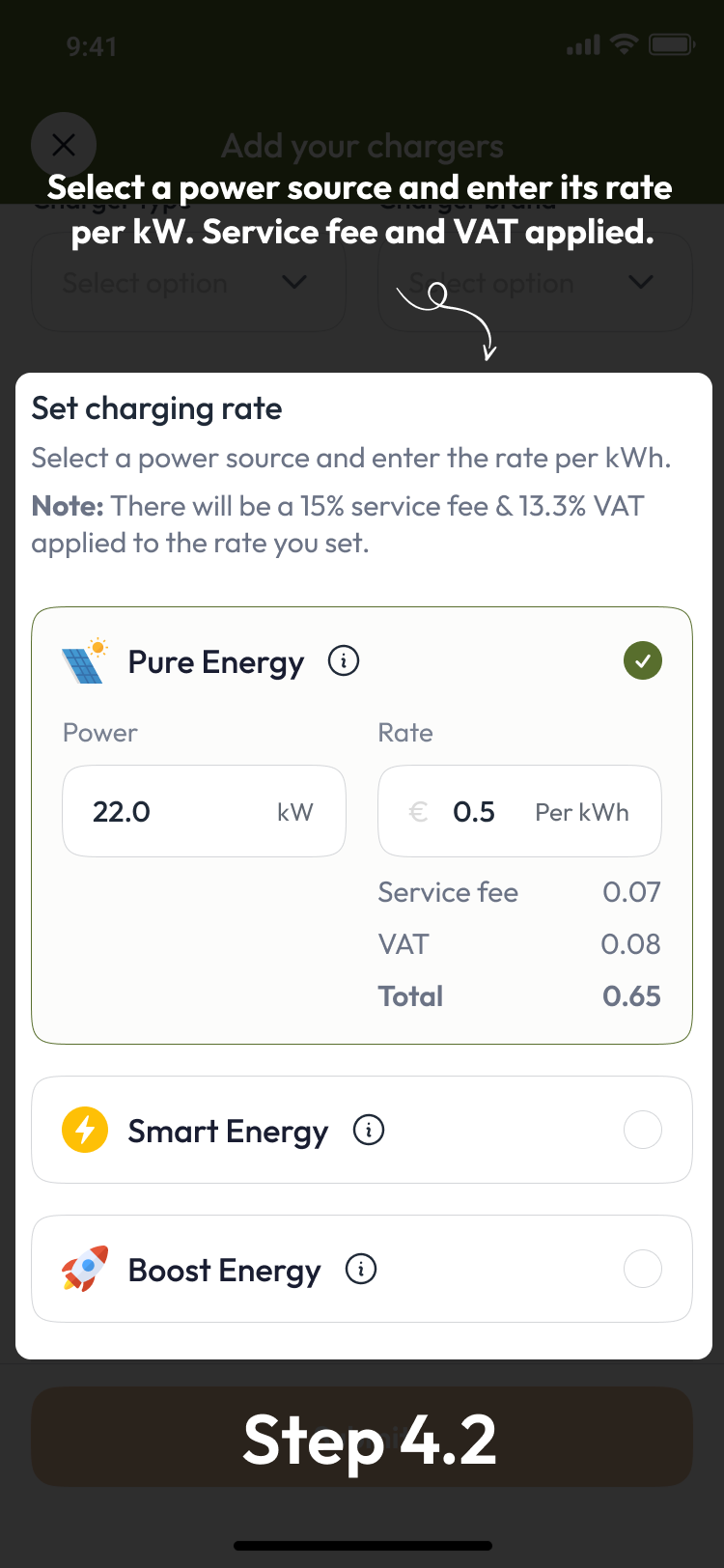
De Energy Hub app, step 4.2: choose Pure, Smart or Boost Energy and set your rate per kWh

Set your rate, guests see it up front

Set a rate per kWh for each energy label you offer. Guests see the rate, the 15% service fee and VAT, and the total before they confirm, and pay by card in the app. You keep 100% of the rate you set.

  • A multi-day stay is one booking, priced as continuous time from start to end at your rate
  • Change a hub's rate whenever it has no bookings
  • Payouts are made daily, when there is something to pay out
☀️ Pure: 100% renewable from your own site🔄 Smart: renewables and grid🚀 Boost: full grid power

How pricing and fees work →

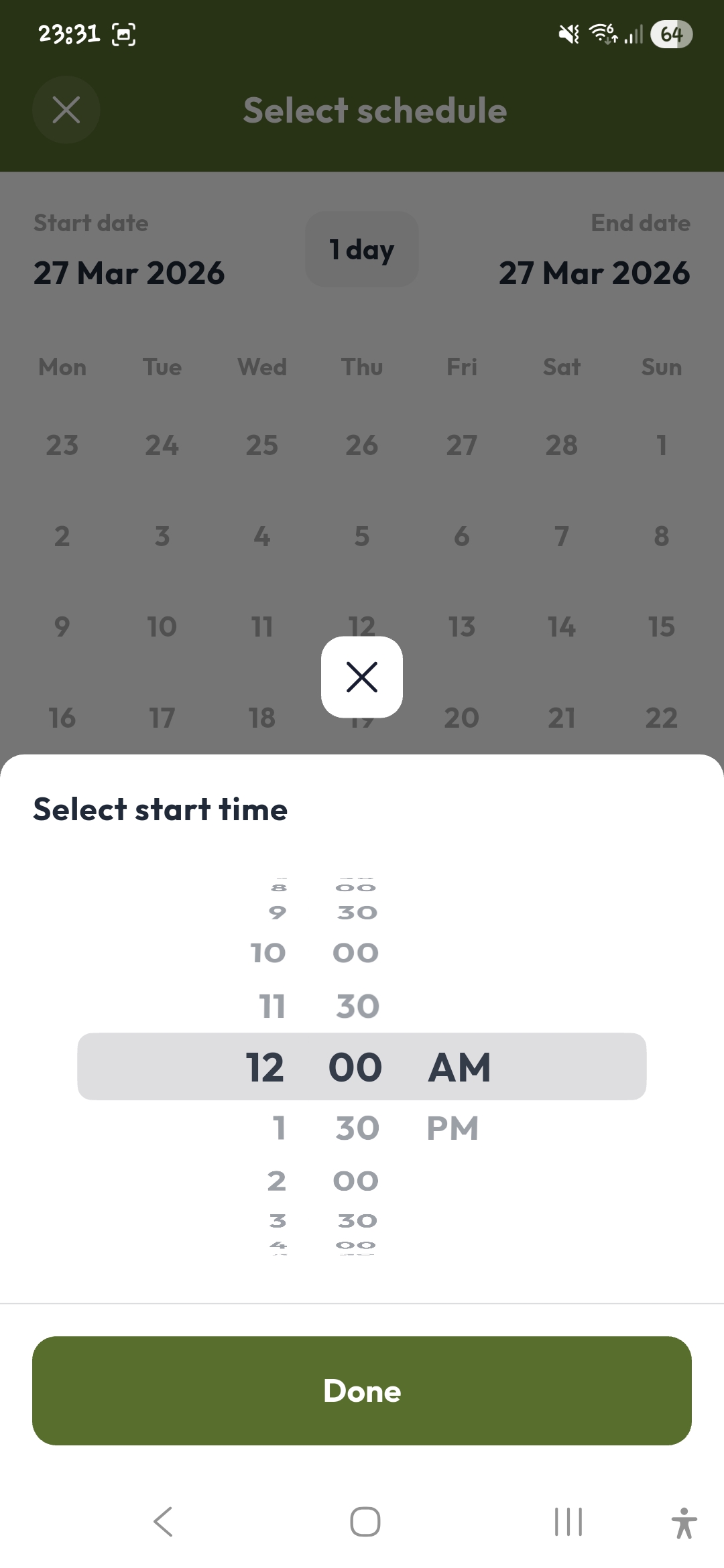
De Energy Hub app: select a start time and booking length

Book it for your guest

Make the booking on your guest's behalf before they arrive. Guests need the app and an account to check in and out when they get there, and you see the booking on your host screens.

  • Book charging, parking or both
  • Guests can still book for themselves
  • Guests can message you in the app
Between guests

Open your charger to other drivers too

Set the days and hours you offer, and any driver can book in those windows. Drivers on the road can find your charger on the map in the app and book it, and on full-price bookings you keep 100% of the rate you set.

Ireland is still building its charging network. Each holiday let that opens a charger adds a stop to the route for touring EV drivers, and helps drivers of every vehicle type find somewhere to charge.

⏰ You set the hours💶 You set the rate📊 Earnings by day, week and month
De Energy Hub app map of Ireland with EV charging hubs shown as green pins, plus search and filters
What you list

The charger, the space, or both

List your charger as a Charging Hub, your parking as a Parking Hub, or link the two so a guest books the space and the charger in one booking.

⚡ Charging HubYour charger, listed with its name, maximum speed, connector type and brand, and your rate per kWh. Each charger gets its own QR code.
🅿️ Parking HubThe space at your property, free or paid per 30-minute slot with a weekday and a weekend rate, with your rules and instructions for drivers.
🔗 Park & ChargeLink the two so one booking and one payment covers the space and the charger.
Set up once

Add your charger, print your QR code, go live

It works with the charger you already have, and the app takes the booking and the payment, so you do not need a pay station. Create a host account, add your charger, set your rate and print its QR code. There is no application and no waiting period, and set-up is typically under an hour.

Setup guides & resources

Everything you need to get started

📖 Hub setup guideEvery screen for creating a Charging Hub and a Parking Hub. 🧰 Host featuresBookings, notifications, messages and earnings in the app. 📘 All app featuresHow hubs, bookings, promo codes and pricing work. 🔌 How guests book a chargerA guide to booking an EV charger in Ireland. 💶 Charging and parking pricingA reference for charging and parking prices in Ireland when you set your rates. 📈 Earn from a charger or spaceHow businesses and owners earn from a charger or parking space.
Got questions?

Holiday Lets & Airbnb FAQ

Why offer EV charging to holiday let guests?

+
EV-driving guests like to know charging is available before they arrive. A charger they can book in the app, with the price shown up front, is clearer than an informal arrangement, and you choose whether to include it in the stay or charge your own rate.

Should I include EV charging in the stay, or charge guests?

+
You can do either on the same charger. To include charging in the stay, request a complimentary promo code from De Energy Hub and share it with your guests. They type it into the Have a promotional code field when they book, the booking skips the payment screen, and you cover the electricity. A discounted code takes a percentage off the overall price and the guest pays the balance. Otherwise guests pay your rate. You can change a hub's rate when it has no bookings. How promo codes work.

How do guests see what they pay?

+
Before they confirm, guests see your rate, the 15% service fee and VAT, and the total. They pay by card in the app and receive an invoice for each paid booking. A multi-day stay is one booking with a start and end date, priced as continuous time from start to end at your rate. How pricing and fees work.

What if I am not at the property when a guest arrives?

+
Guests book in advance or scan the QR code at the charger, and check in through the booking when they arrive. They can add a photo at check-in and check-out if they choose. You see every booking and who made it, and you are notified when a guest checks in or out. Guests can message you in the app about anything to do with your hub.

Can I book the charger for my guest?

+
Yes. You can make a booking on your guest's behalf before they arrive. Guests need the app and an account to check in and out.

Can other drivers use my charger?

+
Yes. Every hub is listed in the app and visible to any driver, including company vehicles and fleets. You set the days and hours you offer, and any driver can book in those windows. On full-price bookings you keep 100% of the rate you set, and opening your charger helps drivers find somewhere to charge on their route while Ireland builds out its charging network.
Do I need new equipment or a pay station, and how do I start?

+
No. De Energy Hub works with the charger you already have, and the app takes the booking and the payment, so you do not need a pay station. Download the app and create a host account. Add a Charging Hub with your charger's speed, connector type and brand, set your rate and the days and hours it is open, and print its QR code. There is no application or waiting period, and set-up is typically under an hour. Payouts are made daily, at the end of the day, when there is something to pay out. See the hub setup guide.

Holiday let features current as of October 2026. Questions? Get in touch.

Make charging part of the stay.

Works with your existing charger, and the app takes the booking and payment, so no pay station is needed. Open your charger to other road users too, and help drivers find somewhere to charge while Ireland builds out its charging network. De Energy Hub is live now on the App Store and Google Play.